Your story deserves to be told well.

Visual, craft-aware story development — from spark to screen.
Everything you need to write better stories
A visual approach to story development. Character portraits, location images, relationship maps, graphical timelines, and an interactive stage — plus persistent entity memory, 25+ story structures, workshop tools, and a professional screenplay editor.
Improvise Story Wizard
Go from a blank page to a complete first draft in minutes.
A guided wizard that helps you build an entire screenplay from scratch. Set the genre and tone, get creative sparks, choose from 5 logline options (or write your own), then watch as the system generates your synopsis, characters, structure, and scene outlines. Everything is editable—the system proposes, you decide. Optionally, have the Improv Engine generate a complete first draft of your entire script right from the wizard.
Full Script Generation
Generate a complete first draft with narrative intelligence built in.
Go from outline to finished script with one button. The system generates scene plans and content for every sequence in order, maintaining narrative cohesion throughout. It tracks canon facts to prevent contradictions, manages narrative threads with urgency scoring, enforces setup/payoff chains (Chekhov's guns), and calibrates sequence lengths to hit your target runtime. In the final act, it ensures all story promises are resolved. Then run the story through Dr. Greenlight for holistic analysis and iterative improvement.
More Formats Coming Soon
Screenplays today. Novels, TV series, stage plays, graphic novels, and more on the roadmap.
StoryBaker is screenplay-first today, with industry-standard scene headings, Fountain export, and professional formatting. The platform is architected to adapt across formats — novels with chapters and prose styling, TV series with episode management, stage plays, graphic novels, and more are next on our roadmap. Each upcoming format will bring its own terminology, structure templates, and export options.
Improv Engine
Plan scenes and beats, then generate faithful drafts in seconds.
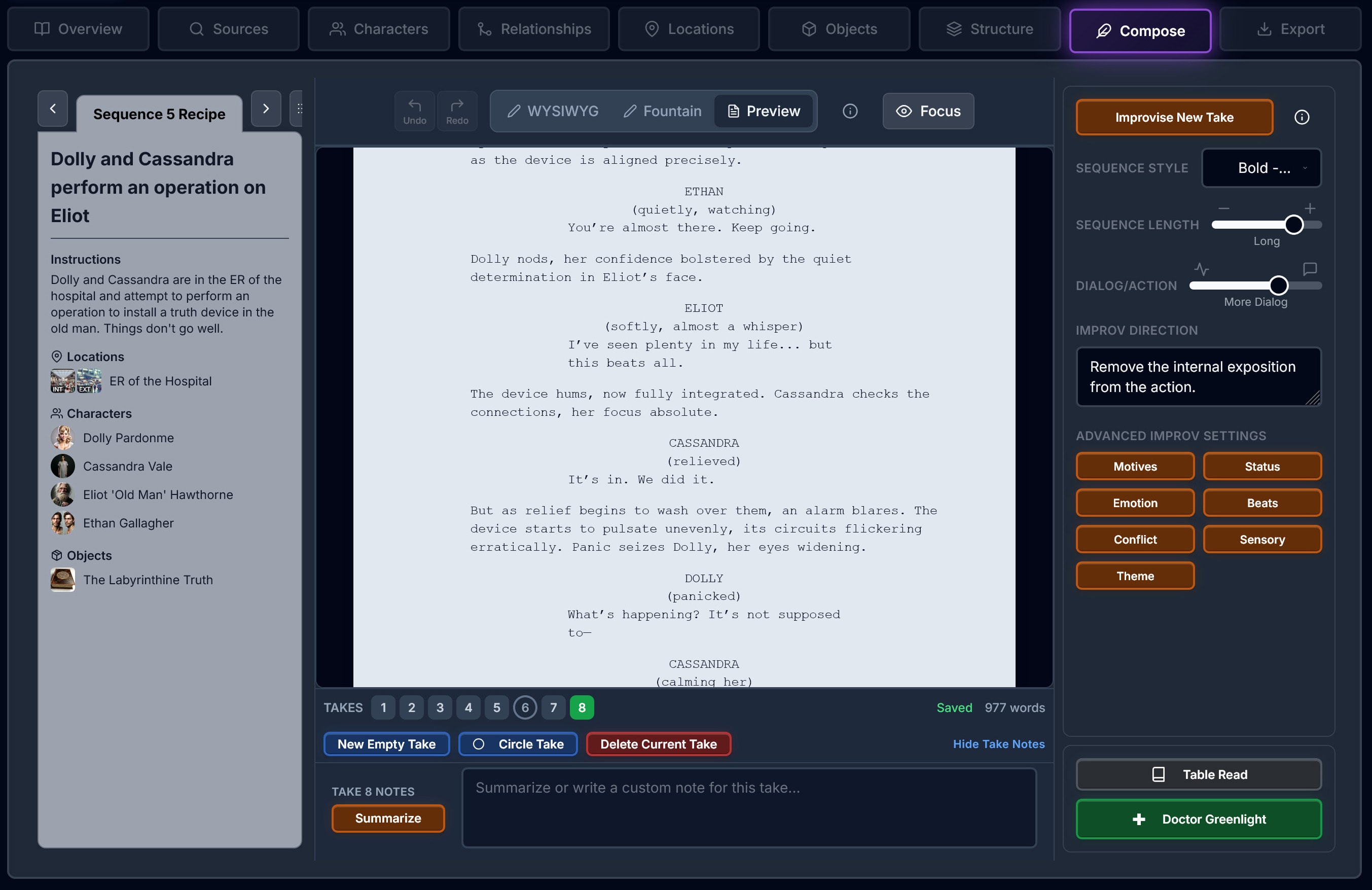
Break each sequence into scenes and dramatic beats — Setup, Escalation, Turn, Release — with descriptions and character assignments. Then let the Improv Engine generate a complete draft that faithfully follows your blueprint, beat by beat. Or skip the plan and improvise freely. Generate multiple "takes" to explore different directions. The Improv Engine understands each character's psychology, relationships, and story context, so every version stays true to your world.
Plan & Write Modes
Plan your scenes and beats, then write — two modes in one Compose tab.
The Compose tab has two modes. In Plan mode, build a structured blueprint for each sequence: define scenes with locations and characters, then add dramatic beats with functions (Setup, Escalation, Turn, Release), descriptions, and character assignments. In Write mode, draft in a rich WYSIWYG editor with industry-standard screenplay auto-formatting. The Improv Engine uses your plan as a beat-by-beat blueprint when generating content, so your structural vision is preserved in the output. Switch between planning and writing anytime.
Focus Mode
An uncluttered interface to focus purely on the writing task at hand.
Strip away distractions and enter a clean, minimal writing environment. Focus Mode hides panels, menus, and tools—leaving just you and your words. Perfect for deep writing sessions when you need to get into flow state. All your tools are still one click away when you need them, but out of sight when you don't.
Takes System
Every version saved. Compare takes side-by-side. Nothing lost.
Never lose a good idea again. Every scene improvisation is saved as a numbered "take" you can revisit anytime. Circle your favorites to mark the keepers. Compare multiple versions side-by-side to pick the best moments from each. Merge elements from different takes, or start fresh while keeping your history intact. Your creative exploration is always preserved.
Idea Board & Mixer
Capture notes, links, images, and references. Drag a few into the Mixer to bake new story elements.
The Idea Board is your project scratch pad: add notes, sketches, links, images, and documents with drag-and-drop or quick-add tiles. Images resize in your browser before upload; links and docs get AI-normalized into compact ingredients. Drag idea cards or existing characters, locations, and objects into the Mixer's four slots, pick a recipe (character, location, object, thread, story, or sequence), and bake suggestions into the Oven. Pin north-star references, filter by type or tag, and link cards to entities—so inspiration stays inside the story instead of scattered across apps.
Character Psychology
Build deep characters with psychological traits, motivations, and alignments.
Define characters using "Big Five" personality traits, moral alignments, archetypes, mindsets, core motivations, secret desires, and backstory. The Improv Engine uses this psychological profile to generate authentic dialogue and reactions that stay true to who your character really is—even in scenes you haven't planned.
Talk to Your Story
Chat with characters, objects, and locations. Every element of your story has a voice.
Great stories have depth in every element—not just characters. A haunted house has history. A sword has battles. A getaway car has a temperament. Interview any entity to discover details you haven't imagined yet—realistic mechanics, history, and atmosphere. Facts discovered during conversation are automatically saved to that entity's memory bank, and you can view, edit, add to, or delete any of them. When you generate scenes, this curated memory is fed directly to the Improv Engine. Every piece of your world becomes richer, more layered, and internally consistent.
Persistent Entity Memory
Characters, locations, and objects remember everything—and it all flows into scene generation.
Every entity in your story has a saved memory bank stored in the database. Facts discovered during chat are automatically saved, and you can add, edit, or delete any fact at any time—giving you full curatorial control. Chat with a detective about their first unsolved case—that detail is saved and referenced in scenes set years later. Establish that a bar has a sticky corner booth and a broken jukebox—the Improv Engine weaves those details in automatically. This isn't chat history. It's living, editable memory that makes every improvised scene more authentic, more consistent, and unmistakably yours.
Relationship Maps
Visualize character connections, status dynamics, and power relationships.
Map the web of relationships between all your characters. Define trust levels, romantic tension, rivalry, mentorship, and family bonds. Track how relationships evolve across your story's timeline. The Improv Engine references these dynamics when characters interact, creating authentic tension and subtext without you having to spell it out.
Locations
Build rich locations with images, atmosphere, and discoverable depth through conversation.
Create location profiles with mood, atmosphere, and sensory details. Upload or generate reference images for interiors and exteriors. Then go deeper: chat with any location to discover its hidden rooms, its history, what it sounds like at 3am. Ask a courtroom about its most dramatic case. Interview a spaceship about its malfunctions. Everything you discover is saved to that location's memory and automatically used by the Improv Engine when you set a scene there.
Objects & Props
Track story-significant objects with images, symbolism, and discoverable detail through chat.
Define props, objects, and vehicles that matter to your story—a grandmother's ring, a mysterious letter, a weapon with history. Add images, backstory, and symbolic meaning. Then personify them: chat with a vintage car about why it stalls in the rain, ask a family heirloom about the generations that held it, interrogate a locked diary about what it's hiding. Every object in a great story carries meaning—this tool helps you find it. Details are saved to the object's memory and flow into scene generation automatically.
Narrative Threads
Subplots, character arcs, mysteries, and thematic ideas — tracked and woven automatically.
Narrative threads are the connective tissue of your story. The Improv Engine automatically discovers and tracks subplots, character arcs, thematic ideas, mysteries, and relationship dynamics across every sequence. View them as color-coded swim lanes in the Connections tab, or as ribbon overlays on your timeline. Choose threads during story creation to guide generation, or let the engine discover its own. Doctor Greenlight evaluates thread satisfaction — flagging dangling subplots, missing setups, and missed payoff opportunities. Threads work silently under the hood or become your primary story-planning tool.
Story Structures
25+ professional structures with detailed act and sequence breakdowns.
Choose from Hero's Journey, Save the Cat, Three-Act, Five-Act, Story Circle, Story Spine, Fichtean Curve, Romance Beat Sheet, Kishōtenketsu, and many more — each with detailed beat sheets and sequence breakdowns for screenplays. Map your scenes to structural beats, customize structures, or build your own.
Sequence Timeline
Visualize your entire story arc with an interactive sequence timeline.
See your complete narrative laid out visually—every act and sequence in one scrollable timeline. Drag to reorder sequences, spot pacing issues at a glance, and understand how your story flows. Color-coded beats show where you are in the structure. Zoom out to see the big picture or dive into sequence details. Perfect for managing complex, multi-threaded narratives.
Workshop Controls
Conflict tuner, dialogue balance, emotion arcs, and sensory palette.
Fine-tune scene generation with intuitive controls. Adjust conflict intensity from subtle tension to explosive confrontation. Balance dialogue vs. action. Set the emotional arc—build slowly or hit hard. Choose sensory emphasis: visual, auditory, tactile. Shape the Improv Engine's output to match your creative vision without writing detailed prompts.
Doctor Greenlight
Improv Engine story editor — per-sequence fitness and full-story narrative analysis.
Get a comprehensive fitness score for individual sequences or analyze your entire script holistically. Per-sequence analysis scores structure, dialogue, character truth, tension, and emotional resonance. Story-level analysis evaluates your full narrative arc—character completeness, thread resolution, setup/payoff tracking, pacing, thematic consistency, and story coherence. Accept suggestions, refine them, and have the system regenerate targeted sequences to improve your score. An iterative improvement loop where StoryBaker critiques its own work and helps you make it better.
The Stage
Perform table reads and improvise scenes live in an interactive graphical environment.
The Stage is your interactive testing ground. Run performed table reads with character voices, environmental audio, and a visual stage — or switch to improv mode and generate new scenes on the fly with real-time director input. Test dialogue, experiment with blocking, and hear how your scenes sound before committing to a draft. It's where your script comes to life.
Import Story
Bring in existing scripts. Import into a new story or continue working in SBS.
Upload existing screenplays or outlines in Fountain, FDX, DOCX, TXT, or PDF format. Choose to import your script into a fresh SBS story — extracting characters, locations, objects, and structure — or preserve your original written text and continue developing it with SBS's improv tools, takes system, and relationship maps. Cross-chunk entity deduplication and Improv Engine–assisted validation ensure clean, accurate imports.
Export Tools
PDF, Fountain, DOCX. Character bibles. Production-ready.
Export industry-standard formats: properly formatted PDF, Fountain, or Word. Generate character bibles with all profile details, images, and relationship maps. Create location guides for production. Export scene breakdowns and beat sheets. Everything formatted for professional submission or production use.
Images & Design
Generate or upload character portraits, location images, and story covers.
Generate or upload images for characters, locations, and props. Create consistent character portraits that match your vision. Design atmospheric location references. Generate professional story covers and mood boards. All images are saved to your entities for reference and inspiration while writing.
Built for Long-Form
Feature films, TV pilots, and multi-act screenplays. Manage complex stories with ease.
Organize massive stories with multiple acts and dozens of sequences. Track storylines and through-lines across an entire feature or pilot. Manage ensemble casts with dozens of characters. The system scales from short films to epic features, keeping all your story elements organized and accessible.
Entity Library
Reuse characters, locations, and objects across all your stories.
Save any character, location, or object to your personal library. Instantly add them to new stories—a recurring character in a series, a shared universe location, or signature props. Each copy becomes a new version you can develop further without affecting the original. Build your own creative universe over time.
Writing Personas
Create author avatars with distinct styles. Switch voices for different stories.
Create different writing personas with unique traits, backgrounds, and personalities. When you chat with your characters, they'll respond to your persona—not just "the writer." A hardboiled detective persona gets different reactions than an empathetic therapist. Switch personas to explore how characters relate to different people or to roleplay interviews and conversations from fresh angles.
“Can't I just ask ChatGPT?”
You can — for a scene or two. But chatbots weren't built for long-form storytelling. They forget your characters, ignore your structure, give you no creative control, and hand you a wall of text with no visual context. Here's what changes when you use a visual platform built for writers.
Memory
Forgets your characters, locations, and plot points after a few messages. By scene 20, it contradicts itself.
Every entity has a saved memory bank stored in the database. Facts are auto-saved from chat, and you can add, edit, or delete them anytime. This memory is fed directly into scene generation.
Creative Control
You get whatever the chatbot decides to write. Adjusting tone or pacing means re-prompting and hoping for the best.
Workshop controls let you tune conflict, dialogue balance, emotion arcs, and sensory palette before generation. You direct — the Improv Engine executes.
Story Structure
No concept of acts, midpoints, or climaxes. Can't visualize your story arc or track where you are in the narrative.
25+ structure templates (Hero's Journey, Save the Cat, etc.) with a visual timeline. The Improv Engine knows where each scene lives in your story.
Talk to Your Story
You describe characters to the chatbot. It has no model of who they are, what they want, or how they relate to each other.
Chat directly with characters, locations, and objects. Facts discovered in conversation are automatically saved to their memory — and you can curate, edit, or expand that memory yourself.
The Stage
You read the output on screen. No way to hear how dialogue sounds or test pacing with real voices.
An interactive graphical environment where you can perform table reads with character voices, or improvise new scenes on the fly with real-time director input.
Narrative Coherence
By sequence 10, the chatbot forgets what happened in sequence 3. No tracking of story promises, character arcs, or Chekhov's guns.
StoryBaker tracks canon facts, narrative threads, and setups/payoffs across your entire story. Every sequence generation is informed by everything that came before. Generate a full first draft and then run it through story-level analysis to catch arc issues, dropped threads, and unresolved setups.
Visual World Building
A wall of text. No images, no visual maps, no way to see your story world. Traditional screenwriting tools are just as text-heavy.
Character portraits, location images, object photos, story covers, visual relationship maps, and a graphical sequence timeline. See your story, don't just read it.
Professional Output
Copy-paste from a chat window. No proper formatting, no export options, no character bibles.
WYSIWYG editors, Fountain import/export, PDF/DOCX output, character bibles, and location guides — all industry-standard.
Every writer struggles. We built the fix.
Tap a writing problem to reveal the StoryBaker solution.
Common Writing Problems
Writing Problems
StoryBaker Solution
Go from idea to full story in minutes with Improvise Wizard
9-step guided wizard builds your entire story
Improv Engine generates loglines, synopsis, characters, and structure
Everything is editable—the Improv Engine proposes, you decide
How we stack up
Chatbots, screenwriting software, and prose generators each do one thing. StoryBaker does all of it — and things none of them can.
| Feature |  StoryBaker StoryBaker | ChatGPT / Claude | Scriptlaunch | Final Draft | Sudowrite | NovelAI |
|---|---|---|---|---|---|---|
| Guided Story Wizard | ◐ | |||||
| Multi-Format Roadmap | ◐ | |||||
| Persistent Entity Memory | ||||||
| Improv Engine scene generation | ◐ | |||||
| Entity Chat / Improv | ◐ | ◐ | ||||
| Character Psychology | ||||||
| 25+ Story Structure Presets | ||||||
| Screenplay Format | ||||||
| Novel Format | ◐ | ◐ | ||||
| Multi-Take System | ||||||
| Stage (Table Read + Improv) | ◐ | |||||
| Script Analysis | ||||||
| Full Script Generation | ◐ | ◐ | ||||
| Story-Level Analysis | ||||||
| Narrative Thread Tracking | ||||||
| Workshop Controls | ◐ | |||||
| Relationship Maps | ||||||
| Visual World Building | ||||||
| Idea Board + AI Mixer | ||||||
| Total Features |  StoryBaker: 15/19 StoryBaker: 15/19 | 0/19 | 2/19 | 1/19 | 3/19 | 2/19 |
| Feature | Story Baker | Chat GPT | Script launch | Final Draft | Sudo write | Novel AI |
|---|---|---|---|---|---|---|
| Guided Story Wizard | ◐ | |||||
| Multi-Format Roadmap | ◐ | |||||
| Persistent Entity Memory | ||||||
| Improv Engine scene generation | ◐ | |||||
| Entity Chat / Improv | ◐ | ◐ | ||||
| Character Psychology | ||||||
| 25+ Story Structure Presets | ||||||
| Screenplay Format | ||||||
| Novel Format | ◐ | ◐ | ||||
| Multi-Take System | ||||||
| Stage (Table Read + Improv) | ◐ | |||||
| Script Analysis | ||||||
| Full Script Generation | ◐ | ◐ | ||||
| Story-Level Analysis | ||||||
| Narrative Thread Tracking | ||||||
| Workshop Controls | ◐ | |||||
| Relationship Maps | ||||||
| Visual World Building | ||||||
| Idea Board + AI Mixer | ||||||
| Total | 15/19 | 0/19 | 2/19 | 1/19 | 3/19 | 2/19 |
Simple, transparent pricing
Start with Hobby at $5/month, or try Pro free for 14 days.
Hobby
Everything you need to start writing
- 5 stories
- Unlimited characters, locations & objects
- Standard story structures
- Character psychology tools
- Multi-take system
- The Stage
- 1 GB storage
- 300
 /month — added monthly
Billed monthly. Cancel anytime.
Pro
The full StoryBaker experience — try it free
- Everything in Hobby, plus:
- Import Story
- Unlimited stories
- All story structures
- Mobile reader — browse & read on your phone
- Priority support
- 10 GB storage
- 500 /month — added monthly
No charge for 14 days. Cancel anytime.
Founders
Limited-time founding member offer
- Lifetime access to Pro features
- No subscription — one-time purchase
- Founding member badge
- Early access to new features
- Priority access to the dev team
- 10 GB storage
- 5,000 bonus
Studio / Team
For writing rooms and teams
- Everything in Pro
- Team collaboration
- Shared entity library
- Admin controls
- Usage analytics
- 50 GB/seat storage
- 1,500 /seat/month — added monthly
Frequently asked questions
Everything you need to know about StoryBaker.
StoryBaker is a visual story development studio for screenwriters and visual storytellers. Its modern interface offers powerful tools—character psychology profiles with generated portraits, relationship maps, character, location, and object libraries, and sequence plans for story structure. Test your scenes on the Stage — an interactive graphical environment for performed table reads and on-the-fly improvisation with director input. Build detailed characters, locations, and objects, then have real conversations with any of them to discover new details and ideas. Outline your story, then generate scene drafts in seconds with our Improv Engine. Whether you're writing a feature screenplay, TV pilot, or short film, StoryBaker helps you go from idea to polished script faster than ever—while keeping you in the director's chair.
Dōh is our credit system for improvisational and generative features. Think of it like tokens that power scene generation, entity chat, image creation, and other creative tools. Each tier includes a monthly Dōh top-up (300 for Hobby, 500 for Pro) that accumulates in your balance and never expires. You can also purchase additional Dōh anytime.
No! StoryBaker is a complete story development platform even without the improvisational tools. You can create stories, build detailed character profiles with psychology traits, design locations and objects, outline your story structure, and write scenes manually—all without spending any Dōh. The generative features (scene improvisation, entity chat, image creation) are there when you want them, but they're optional. Many writers use StoryBaker primarily as an organizational tool and only tap into the Improv Engine for specific moments.
The Improv Engine is StoryBaker's story generation system. It's like having an improv partner who knows your characters, locations, props, and plotlines intimately. In the Compose tab's Plan mode, you can break each sequence into scenes and dramatic beats — Setup, Escalation, Turn, Release — with descriptions and character assignments. Then the Improv Engine generates a complete draft that faithfully follows your blueprint, beat by beat. Or skip the plan and improvise freely — set the parameters, adjust conflict level and tone, and generate a fresh take in seconds. Think of yourself as the director: you call the shots, and the Improv Engine gives you a fresh take on your vision. Don't like the conflict level? Dial it up and generate another take. Want more subtext? Give a character a secret and try again.
The Improvise Story Wizard is a 9-step guided process that takes you from a blank page to a fully structured story in minutes. You pick a format, set the genre and tone, and the system generates creative sparks, logline options, a synopsis, characters, a full story structure, and scene outlines. Everything it generates is editable before you proceed—the system proposes, you decide. It's the fastest way to go from "I have an idea" to "I have a story I can start writing."
Today, StoryBaker is focused on screenplays — feature films, TV pilots, and short films — with industry-standard formatting, scene headings, and Fountain export. The platform is architected to expand: novels, TV series management, stage plays, graphic novels, and more are on our roadmap, each with their own terminology, structure templates, and editor. You can export your screenplay to PDF, Word (.docx), Fountain, or HTML preview.
You can have a real conversation with any entity in your story—characters, objects, and locations. Ask a character about their secrets. Interview a haunted house about its history. Interrogate a locked diary about what it's hiding. StoryBaker draws on vast knowledge to provide specific, realistic details—so when you ask a vintage car about its engine, you get real mechanical detail. Facts discovered during these conversations are automatically saved to that entity's memory bank in the database. You can view, add to, edit, or delete any of those facts at any time—giving you full control over what StoryBaker knows about your world. When you generate scenes, the Improv Engine automatically references all entity memories to produce richer, more consistent output.
In great stories, every element carries meaning. A house isn't just a backdrop—it has history, secrets, and mood. A prop isn't just a thing—it has symbolic weight and practical detail. Chatting with objects and locations helps you discover layers you haven't imagined yet. Ask a courtroom about its most dramatic case and you might find a subplot. Ask a family heirloom about its previous owners and you'll uncover backstory. StoryBaker provides realistic, specific details—real architecture, real mechanics, real atmosphere. Everything you discover is saved and used automatically when generating scenes, so your story gains depth and consistency without extra effort. Think of it as gestalt storytelling: when every piece of your world has been thoughtfully explored, the whole becomes greater than the sum of its parts.
Takes are different versions of the same scene or sequence. Like a film director shooting multiple takes, you can generate several versions of a sequence with different parameters—more conflict, different emotional tone, varying dialogue/action balance. All takes are saved, so you can compare them side-by-side and cherry-pick the best moments from each. Takes encourage non-destructive experimentation, where "happy accidents" emerge.
Your content is always yours. If you cancel your subscription, you can still log in to view and export everything you've created. Resubscribe anytime to resume creating and editing. We believe in graceful degradation, not holding your work hostage.
Yes. Your stories, characters, and generated content are private to your account. We don't use your creative content to train external models. We don't share it with third parties. Your stories are your intellectual property.
Yes! Import Story lets you bring in existing screenplays or outlines in multiple file formats (Fountain, FDX, DOCX, TXT, PDF). You choose how: Adapt mode extracts characters, locations, objects, and structure so you can develop fresh content using SBS tools. Continue mode preserves your original written text — dialogue, action, scene description — so you can keep working on it in SBS with improv tools, takes, and relationship maps.
The Idea Board is your project's creative scratch pad. Add notes, sketches, links, images, and documents with drag-and-drop or quick-add tiles—then filter, pin, and link them to characters, locations, and objects. The Mixer at the bottom lets you drop up to four ingredients into slots, pick a recipe (new character, location, object, thread, story, or sequence), and bake AI suggestions into the Oven while you keep writing elsewhere. It's how scattered inspiration becomes structured story material without leaving StoryBaker.
StoryBaker uses state-of-the-art models across text, image, and audio—selected based on quality, speed, and cost for each task. Models may be upgraded or replaced over time as the technology landscape evolves (video is on our radar too). This happens behind the scenes and is transparent to you. What matters is the results: our proprietary system and character psychology engine ensure StoryBaker understands dramatic structure, subtext, and character voice—not just generic output.
Not at all! StoryBaker is designed for writers at every level. Beginners benefit from structure presets and the guided workshop tools. Experienced writers appreciate the speed of iteration and character development depth. Whether you're writing your first screenplay or your twentieth, StoryBaker adapts to your workflow.
Hobby ($5/month) gives you 5 stories, unlimited entities, and 300 Dōh added monthly—perfect for getting started with StoryBaker. Pro ($19/month with a 14-day free trial) unlocks unlimited stories, 500 Dōh added monthly, plus premium features like manuscript import, advanced Improv Engine tools, custom structures, mobile reader, and more.
Founders is a limited-time lifetime deal for early believers—only 500 available! Starting at $299 one-time, you get permanent Pro access (no subscription ever), 5,000 Dōh bonus, a founding member badge, early access to new features, and a direct line to the founders. Price increases as slots fill up ($299 → $399 → $499), so early supporters get the best deal. When all 500 are claimed or beta ends, Founders closes forever.
Team collaboration is coming soon with our Studio tier. You'll be able to share stories, maintain shared character/location libraries, and work together in real-time. For now, StoryBaker is optimized for individual writers.
ChatGPT and Claude are brilliant — for a scene or two. But by scene 20, they've forgotten who your characters are, what they want, and what happened earlier. They have no persistent memory, no character psychology model, no story structure awareness, and no way to tune creative parameters like conflict intensity or dialogue balance. StoryBaker solves all of this. Every character, location, and object has persistent memory that accumulates over time and automatically informs scene generation. You can chat with your characters to discover who they really are — and those discoveries stick. Workshop controls let you direct tone, pacing, and emotion instead of hoping a chatbot guesses right. And on the Stage, you can hear your screenplay performed with character voices or improvise new scenes with real-time director input. The result isn't 'plausible text' — it's dramatically coherent storytelling that stays consistent across a full feature-length screenplay.
StoryBaker Studio exists because while nearly everyone has a story or two to tell, the craft was gatekept by traditional barriers—years of study, industry connections, or just the sheer difficulty of turning ideas into properly structured scripts and stories. But here's the thing: you have taste. You know what moves you, what you find interesting, what you feel makes a great story. StoryBaker bridges the gap between having a vision and executing it. Just as YouTube enables anyone to have their own TV channel, and Amazon enables anyone to self-publish a book, StoryBaker Studio enables anyone to make something actually worth reading or watching. This is the democratization of quality storytelling—and we're just getting started.
Ready to write smarter?
Be among the first writers to use StoryBaker's unique combination of improv, psychology, and craft tools to tell better stories.